• Thế Giới Giải Mã

    Bí ẩn nhân loại Leonardo Da Vinci

  • Thế Giới Giải Mã

    Anh hùng thầm lặng Nikola Tesla

  • Thế Giới Giải Mã

    Thần đèn Thomas Edison

  • Thế Giới Giải Mã

    Người thôi miên Adolf Hitler

12 June 2023

Scrum với Kanban là gì?


Scrum và Kanban là hai khái niệm quan trọng trong quản lý dự án. Scrum là một phương pháp thiết kế phần mềm, được sử dụng để quản lý dự án trong quá trình phát triển phần mềm. Scrum bao gồm các quy trình và nguyên tắc để giải quyết các vấn đề liên quan đến quản lý dự án, bao gồm sprint, sprint review, sprint retrospective và daily Scrum meeting.

Kanban là một phương pháp quản lý dự án, được sử dụng để giám sát và quản lý quá trình thực hiện các công việc trong một dự án. Kanban bao gồm các quy trình và nguyên tắc để giải quyết các vấn đề liên quan đến quản lý dự án, bao gồm sơ đồ xử lý, bảng quản lý công việc và các bước trong quá trình thực hiện công việc.


Scrum và Kanban đều có mục đích giúp quản lý dự án hiệu quả hơn. Scrum giúp quản lý dự án bằng cách sử dụng các quy trình và nguyên tắc để giải quyết các vấn đề liên quan đến quản lý dự án, giúp cho các thành viên trong dự án có thể hoàn thành công việc một cách nhanh chóng và chính xác. Kanban giúp giám sát và quản lý quá trình thực hiện các công việc trong một dự án, giúp cho các thành viên trong dự án có thể hiểu rõ hơn về quá trình thực hiện công việc và đảm bảo rằng công việc được thực hiện đúng cách và trong thời gian hợp lý.

Tóm lại, Scrum và Kanban là hai khái niệm quan trọng trong quản lý dự án, giúp cho việc quản lý dự án hiệu quả hơn và giúp các thành viên trong dự án có thể hoàn thành công việc một cách nhanh chóng và chính xác.


21 May 2023

Ivy trong Angular là gì?

Rendering engine

Công cụ kết xuất (Rendering engine) là một phần mềm hoặc chương trình bên trong trình duyệt phân tích cú pháp và biến đổi mã HTML và CSS để trình duyệt có thể hiển thị.


Công cụ trình duyệt biến đổi CSS và JS và hiển thị kết quả ra màn hình

Tuy nhiên, các trình duyệt không thể hiển thị mã HTML và CSS đến từ Angular hoặc bất kỳ khung nào khác vì HTML và CSS không thuần túy (chúng có thể nằm trong các mẫu hoặc thành phần tùy chỉnh). Do đó, cần có thứ gì đó để chuyển đổi các thành phần này thành thứ mà trình duyệt có thể hiển thị. Đây là nơi công cụ kết xuất Angular xuất hiện.

Ivy rendering engine

Ivy là công cụ kết xuất biến mã Angular (mẫu HTML + TS) thành HTML và JavaScript thuần túy mà trình duyệt hiểu được. Khi quá trình chuyển đổi này hoàn tất, trình duyệt có thể hiểu và hiển thị HTML và JavaScript kết quả để hiển thị nội dung, như được minh họa trong hình trên.

Ivy là bản viết lại hoàn chỉnh của View Engine—công cụ mặc định để xây dựng các ứng dụng Angular từ Angular 4 cho đến khi nó ngừng hoạt động trong Angular 8. Đây là công cụ thứ ba kể từ khi tạo ra Angular vào năm 2016 và Angular đã xuất xưởng cùng với Ivy kể từ khi giới thiệu của Angular 9 cho đến ngày nay.


Tóm tắt về cách thức hoạt động của Ivy

Ivy Lợi ích khi sử dụng Ivy

Ivy đi kèm với nhiều cải tiến, bao gồm:

Biên dịch AOT: Ahead of Time (AOT) biên dịch một ứng dụng trước khi chuyển sang môi trường thời gian chạy như trình duyệt. AOT giảm tải cho trình duyệt vì nó biên dịch trước ứng dụng trước khi đến trình duyệt.

Kích thước gói nhỏ hơn: Kích thước gói là lượng mã mà trình duyệt sẽ phải tải xuống để tải ứng dụng của bạn. Ivy giảm kích thước gói thông qua AOT và tree-shaking.

Cải thiện tốc độ: Các ứng dụng góc cạnh tải nhanh hơn trước nhờ kích thước gói nhỏ hơn và khả năng rung cây của Ivy.

Ivy nhanh hơn nhiều so với người tiền nhiệm của nó bởi vì nó hiện được cung cấp với trình biên dịch trước thời hạn (AOT) theo mặc định. AOT cho phép trình duyệt tải ứng dụng nhanh chóng mà không cần tải xuống trình biên dịch và tự xây dựng ứng dụng.

Biên dịch Just-in-time (JIT) là cơ chế biên dịch mặc định trong các phiên bản trước của Angular , qua đó trình duyệt sẽ tải xuống trình biên dịch và xây dựng ứng dụng. Tuy nhiên, quá trình này không hiệu quả vì nó chậm và gây gánh nặng cho trình duyệt.

Lưu ý: Angular chỉ có một trình biên dịch. AOT và JIT chỉ đề cập đến cách thức và thời điểm bạn sử dụng trình biên dịch.

  • Với AOT, trình biên dịch sẽ chạy khi xây dựng Build.
  • Với JIT, trình biên dịch chạy trong thời gian chạy Runtime.

Công cụ Ivy là một phần quan trọng của Angular. Do đó, có một ý tưởng cơ bản về những gì nó làm là quan trọng.

18 May 2023

Ng-Content Switch Case - Angular

08 April 2023

Javascript Basic

08 January 2023

Draw and Fill a polygon and triangle in HTML5

Draw Polygon <Vẽ hình đa giác>
2023
<!DOCTYPE HTML>
<html>
<head>
<title>An example to draw an polygon</title>
<script type="text/javascript">
    function drawPolygon() {
        var canvas = document.getElementById('canvasbox');
        if (canvas.getContext) {
            var objctx = canvas.getContext('2d');
 
            objctx.beginPath();
            objctx.moveTo(75, 50);
            objctx.lineTo(175, 50);
            objctx.lineTo(200, 75);
            objctx.lineTo(175, 100);
            objctx.lineTo(75, 100);
            objctx.lineTo(50, 75);
            objctx.closePath();
            objctx.fillStyle = "rgb(200,0,0)";
            objctx.fill();
 
 
        } else {
            alert('You need HTML5 compatible browser to see this demo.');
        }
    }
</script>
</head>
<body onload="drawPolygon();">
   <canvas id="canvasbox"></canvas>
</body>
</html>
Draw Triangle <Vẽ hình tam giác>
2023
<!DOCTYPE HTML>
<html>
<head>
<title>An example to draw an polygon</title>
<script type="text/javascript">
    function drawPolygon() {
        var canvas = document.getElementById('canvasbox');
        if (canvas.getContext) {
            var objctx = canvas.getContext('2d');
            objctx.beginPath();
            // polygon [x,y, x,y, x,y.....];
objctx.moveTo(50, 50); //x,y objctx.lineTo(50, 125); objctx.lineTo(150, 125); objctx.closePath(); objctx.stroke(); } else { alert('You need HTML5 compatible browser to see this demo.'); } } </script> </head> <body onload="drawPolygon();"> <canvas id="canvasbox"></canvas> </body> </html>

beginPath() Mỗi khi phương thức này được gọi, danh sách sẽ được đặt lại và chúng ta có thể bắt đầu vẽ các hình mới.

moveTo(x, y) điều này sẽ đặt vị trí khởi động của đường dẫn. Trong ví dụ trên, chúng ta đang vẽ đường đi từ (75,50) điểm.

lineTo(x, y) sẽ vẽ đường thẳng trong đó x và y sẽ là điểm cuối. Phương thức này có hai đối số – x và y, – là tọa độ của điểm cuối và điểm bắt đầu của đường phụ thuộc vào điểm cuối của đường dẫn được vẽ trước đó hoặc tọa độ di chuyển tới(x,y). Ví dụ objctx.lineTo(175, 50) sẽ vẽ đường thẳng từ điểm đầu (75,50) đến điểm cuối (175,50).

closePath() sẽ đóng hình bằng cách vẽ một đường thẳng từ điểm hiện tại đến điểm bắt đầu. Nếu hình đã được đóng hoặc chỉ có một điểm trong danh sách, chức năng này sẽ không làm gì.

fillStyle sẽ đặt thuộc tính nền nhưng sẽ không lấp đầy.

fill() sẽ tô hình dạng theo fillStyle. Nếu không có kiểu tô màu thì nó sẽ tô màu đen.

Ví dụ ta có toạ độ của qrcode sau khi quét camera -> Ta cần vẽ đa giác
2023
// Draw the barcodes area.
scanner.onFrameRead = results => {
  // Reset the width and height and empty the canvas
  canvas.width = video.videoWidth;
  canvas.height = video.videoHeight;
  let ctx = canvas.getContext('2d');
  // Set color
  ctx.fillStyle = 'rgba(254,180,32,0.3)';
  for(var result of results){
    // Get localization 
    // polygon [x,y, x,y, x,y.....];
    let x1 = result.LocalizationResult.X1;
    let x2 = result.LocalizationResult.X2;
    let x3 = result.LocalizationResult.X3;
    let x4 = result.LocalizationResult.X4;
    let y1 = result.LocalizationResult.Y1;
    let y2 = result.LocalizationResult.Y2;
    let y3 = result.LocalizationResult.Y3;
    let y4 = result.LocalizationResult.Y4;
    // Draw
    ctx.beginPath();
    ctx.moveTo(x1, y1);
    ctx.lineTo(x2, y2);
    ctx.lineTo(x3, y3);
    ctx.lineTo(x4, y4);
    ctx.fill();
  }
};
DEMO nhanh 
2023
<!DOCTYPE html>
<html>
  <body>
  
    <canvas id="canvas" width="1116" height="837" style="border:3px solid #000;">
    Your browser does not support the HTML canvas tag.</canvas>
    
    <script>
        var canvas = document.getElementById('canvas');
        var ctx = canvas.getContext('2d');
        
        // polygon [x,y, x,y, x,y.....];
        var poly = [0, 294.69374999999997, 0, 294, 256, 0, 256.33124999999995, 0] ;
        
        // copy array
        var shape = poly.slice(0);
        
        ctx.fillStyle = '#f00'
        ctx.beginPath();
        ctx.moveTo(shape.shift(), shape.shift());
        while(shape.length) {
          ctx.lineTo(shape.shift(), shape.shift());
        }
        ctx.closePath();
        ctx.fill();
        ctx.stroke();
    </script>
  
  </body>
</html>


22 December 2022

sudo: apt: command not found


Advanced Package Tool (APT) là một công cụ dòng lệnh được sử dụng để tương tác dễ dàng với hệ thống đóng gói dpkg. APT là phương pháp lý tưởng được sử dụng để quản lý phần mềm trong các bản phân phối Linux dựa trên Debian, chẳng hạn như Ubuntu. Nó quản lý các phần phụ thuộc một cách hiệu quả, duy trì các tệp cấu hình lớn và xử lý đúng cách các nâng cấp và hạ cấp để đảm bảo tính ổn định của hệ thống. Về bản thân, dpkg không xử lý các phụ thuộc đúng cách.

Trong các bản phân phối dựa trên Debian/Ubuntu, việc quản lý phần mềm được thực hiện thông qua tiện ích apt, đây là sự thay thế gần đây cho các tiện ích apt-get và apt-cache. Các lệnh được sử dụng nhiều nhất bao gồm:

CommandDescription
apt listList packages
apt searchSearch in descriptions
apt installInstall a package
apt showShow package details
apt removeRemove a package
apt updateUpdate catalog of available packages
apt upgradeUpgrade the installed software
apt edit-sourcesEdit the repository configuration

Nếu bạn gặp phải lỗi dưới đây khi chạy lệnh apt:

apt: command not found

bạn có thể thử cài đặt gói apt theo lựa chọn phân phối của mình.

DistributionCommand
Debianapt-get install apt
Ubuntuapt-get install apt
Arch Linuxpacman -S apt
Kali Linuxapt-get install apt
CentOSyum install apt
Fedoradnf install apt
Raspbianapt-get install apt

Ví dụ về lệnh apt

1. Cập nhật danh sách các gói và phiên bản có sẵn (bạn nên chạy phần này trước các lệnh `apt` khác):

$ sudo apt update

2. Tìm kiếm một gói nhất định:

$ apt search package

3. Hiển thị thông tin cho một gói:

$ apt show package

4. Cài đặt gói hoặc cập nhật gói lên phiên bản mới nhất hiện có:

$ sudo apt install package

5. Xóa một gói (thay vào đó, sử dụng `purge` cũng xóa các tệp cấu hình của nó):

$ sudo apt remove package

6. Nâng cấp tất cả các gói đã cài đặt lên phiên bản mới nhất hiện có của chúng:

$ sudo apt upgrade

7. Liệt kê tất cả các gói:

$ apt list

8. Liệt kê các gói đã cài đặt: 

$ apt list --installed

28 May 2022

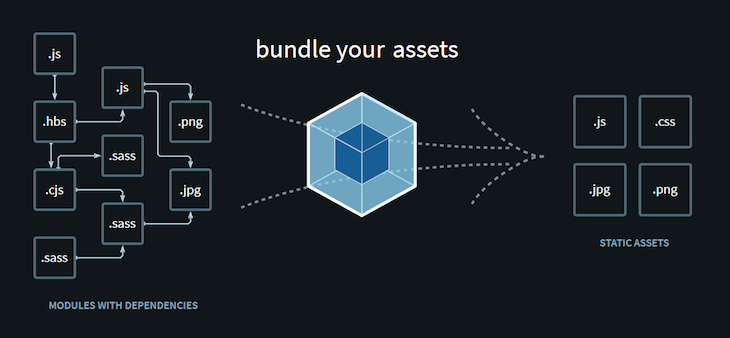
Webpack Init html

 
//==================== Create webpack CLI ===================//
C:\Users\BV_Computer\Downloads\beginer-webpack> npm init -y

{
  "name": "beginer-webpack",
  "version": "1.0.0",
  "description": "",
  "main": "index.js",
  "scripts": {
    "test": "echo \"Error: no test specified\" && exit 1"
  },
  "keywords": [],
  "author": "",
  "license": "ISC"
}
npm i webpack --save-dev npm i webpack-cli --save-dev mkdir src // Tạo file type nul > index.js (Đặt console.log('Hello!')) npx webpack --mode development (Sau khi chạy lệnh này sẽ render ra folder dist) Thêm vào script của file package.json webpack --mode development webpack --mode production //================ Install html-plugin config.js ================// npm i html-webpack-plugin --save-dev // Tạo file type nul > webpack.config.js
const HtmlWebpackPlugin = require('html-webpack-plugin');
const path = require('path');

module.exports = {
  entry: {
    main: path.resolve(__dirname, './src/index.js'),
  },
  output: {
    filename: '[name].bundle.js',
    path: path.resolve(__dirname, 'dist'),
  },
  plugins: [
      new HtmlWebpackPlugin({
        title: 'Demo webpack'
      })
  ]
};
npm run dev (Mở browser dist/index.html để check console.log hiển thị chữ hello!) //================= Install server =================// npm i webpack-dev-server --save-dev https://webpack.js.org/configuration/dev-server/#root
const HtmlWebpackPlugin = require("html-webpack-plugin");
const path = require("path");

module.exports = {
  entry: {
    main: path.resolve(__dirname, "./src/index.js"),
  },
  output: {
    filename: "[name].bundle.js",
    path: path.resolve(__dirname, "dist"),
  },
  devServer: {
    static: {
      directory: path.join(__dirname, "./dist"),
    },
    compress: true,
    port: 9000,
  },
  plugins: [
    new HtmlWebpackPlugin({
      title: "Demo webpack",
    }),
  ],
};

// Update lại script file package.json webpack serve --mode development // Kiểm tra http://localhost:9000/ (Xem console) //================ Install babel =============// npm i babel-loader @babel/core @babel/preset-en v --save-dev https://webpack.js.org/loaders/babel-loader/#root
const HtmlWebpackPlugin = require("html-webpack-plugin");
const path = require("path");

module.exports = {
  entry: {
    main: path.resolve(__dirname, "./src/index.js"),
  },
  output: {
    filename: "[name].bundle.js",
    path: path.resolve(__dirname, "dist"),
  },
  devServer: {
    static: {
      directory: path.join(__dirname, "./dist"),
    },
    compress: true,
    port: 9000,
  },
  plugins: [
    new HtmlWebpackPlugin({
      title: "Demo webpack",
    }),
  ],
  module: {
    rules: [
      {
        test: /\.?js$/,
        exclude: /(node_modules|bower_components)/,
        use: {
          loader: "babel-loader",
          options: {
            presets: ["@babel/preset-env"],
          },
        },
      },
    ],
  },
};

// Tạo file component.js type nul > component.js
const component = () => {
    const element = document.createElement('h2');
    element.innerHTML = "Hey this is new component";
    return element;
}
export default component;
// Update file index.js
import component from "./component";

document.body.appendChild(component());
// Start app npm run dev
//=============== Install css & syle loader =============// npm i css-loader style-loader --save-dev https://webpack.js.org/guides/asset-management/#loading-images
rules: [
      {
        test: /\.css$/i,
        use: ["style-loader", "css-loader"],
      },
      {
        test: /\.(png|svg|jpg|jpeg|gif)$/i,
        type: 'asset/resource',
      },
],
// index.js
import component from "./component";

import logo from "./images/logo-on-dark-bg.png";

import "./styles/style.css";

const img = document.createElement('img');
img.src = logo;
img.width = '300';
document.body.appendChild(img);

document.body.appendChild(component());
// npm run dev

27 May 2022

JavaScript-Interview-Questions

JavaScript Interview Questions ( vES6 )

24 May 2022

JavaScript Interview Questions & Answers


14 May 2022

For loop Javascript

13 May 2022

ES5 vs ES2015 - Something about ES6 Javascript Standard

12 May 2022

Complete Angular Tutorial For Beginners


What is Angular

The Angular is a development platform for building a Single Page Application for mobile and desktop. It uses Typescript & HTML to build Apps. The Angular itself is written using the Typescript. It now comes with every feature you need to build a complex and sophisticated web or mobile application. It comes with features like componentDirectivesFormsPipesHTTP ServicesDependency Injection, etc

Angular Versions

The early version of the Angular was named as Angular 2.  Then later it was renamed to just AngularThen Angular Team releases new versions of the Angular versions Regularly and the last stable version that is available in Angular 10.0.12

The Angular 9 is released on 06.02.2020. The Angular 9 is a major release. This release switches to ivy compiler and runtime by default. The ivy brings smaller bundle sizes, faster & better testing debugging, Improved type checking, build times, etc

Angular 10 is released on 24-06-2020. You can learn about the list of features from this link

Version History

Angular VersionDateDescription
Angular 214.09.2016Initial Version of Angular
Angular 423.03.2017Version 4
Angular 511.11.2017Version 5
Angular 603-05-2018Version 6
Angular 718-10-2018Version 7
Angular 825-08-2019Version 8
Angular 906-02-2020Version 9
Angular 1024-06-2020Version 10
Angular 10.0.1224-08-2020Version 10.0.12

You can read the latest versions at https://github.com/angular/angular/blob/master/CHANGELOG.md

Prerequisites 

The Angular tutorial requires a working knowledge of Javascript, HTML & CSS. It also requires the concept of OOP.

We are going to use Typescript as our language. If you have knowledge of C# or Java, then you would find it very easy.  Take a look at the Typescript Tutorial

Angular Tutorial

Introduction to Angular

This Introduction to Angular Tutorial gives you a glimpse of Angular. Angular is a UI framework for building mobile and desktop web applications. It is built using Javascript. Using Angular you can build amazing client-side applications using HTML, CSS, and Typescript. It is very important to know how the Angular framework works before you start using it. The following tutorials introduce you to Angular and discuss Angulars architecture.

  1. Introduction to Angular
  2. Angular Architecture Overview & Concepts

Getting Started With Angular Tutorial

The Angular has gone through a lot of changes since the version Angular 2. From the Angular 7 version, installing and creating a new project in angular has become very simple. The only thing you need to do in install and Visual Studio code, NPM Package manager & Angular CLI. Once, you install the required dependencies, creating a new project is as easy as running a simple command ng newAngular CLI takes care of Configuration & initialization of various libraries. 

The following step by step tutorial will take you through the process of creating an Angular application

  1. Installing and Setting Up an Angular Development Environment 
  2. How to Create a new project in Angular
  3. Bootstrapping in Angular

Components

The Component is the main building block of an Angular Application. A Component contains the definition of the View and the data that defines how the View looks and behaves.  The Angular Components are plain javascript classes and defined using @component Decorator. This Decorator provides the component with the View to display & Metadata about the class

The Component passes the data to the view using a process called Data Binding. This is done by Binding the DOM Elements to component properties. Binding can be used to display component class property values to the user, change element styles, respond to a user event, etc.

  1. Introduction to Angular Components
  2. Data Binding in Angular
  3. Interpolation in Angular
  4. Property Binding in Angular
  5. Event Binding in Angular
  6. Two way Binding & ngModel in Angular
  7. ngModelChange & Change Event
  8. Adding Child Component in Angular

Directives

The Angular directive helps us to manipulate the DOM. You can change the appearance, behavior, or layout of a DOM element using the directives. They help you to extend HTML. The Angular directives are classified into three categories based on how they behave.  They are Component, Structural and Attribute Directives

The ngFor is an Angular structural directive, which repeats a portion of the HTML template once per each item from an iterable list (Collection). The ngSwitch allows us to Add/Remove DOM Element. It is similar to the switch statement of Javascript.  The ngIf allows us to Add/Remove DOM Element. 

The ngClass Directive is an Angular Attribute Directive, which allows us to add or remove CSS classes to an HTML element. The ngStyle directive allows you to modify the style of an HTML element using the expression.  Using the ngStyle you can dynamically change the style of your HTML element.

  1. Angular Directives
  2. ngFor 
  3. ngSwitch
  4. ngIf
  5. ngClass
  6. ngStyle
  7. ngFor Trackby
  8. Custom Directive

Pipes

The Angular pipes are used to Transform the Data. For Example, the Date pipe formats the date according to locale rules. We can pass arguments to pipe and chain pipes. The Angular also allows us to create the Custom Pipe

  1. Angular Pipes
  2. Angular Custom Pipes
  3. Date Pipe
  4. Async Pipe
  5. KeyValue Pipe
  6. Using Pipes in Components & Services

Component Communication

  1. Angular Component Communication
  2. Passing data from Parent to child component 
  3. Passing Data from Child to Parent Component

Component Life Cycle Hook

The life cycle hooks are the methods that angular invokes on directives and components as it creates, changes, and destroys them. Using life-cycle hooks we can fine-tune the behavior of our components during creation, update, and destruction.

  1. Component Life Cycle
  2. OnInit & OnDestroy
  3. Onchanges
  4. DoCheck

Angular Forms

The data entry forms can be very simple to very complex. The Forms contain large no of input fields, a variety of fields like Text boxes, Dates, Numbers, Emails, Password, Check Boxes, Option boxes, etc.  These fields can Span multiple tabs or multiple pages. Forms may also contain complex validation logic interdependent on multiple fields.

The Angular forms modules are designed to handle all of the above and a lot more. The Angular Forms now supports Reactive forms approach to Forms development. The older way of Template-based approach is also supported

  1. Angular Forms Tutorial: Fundamental & Concepts
  2. Template Driven Forms in Angular
  3. Set Value in Template Driven forms in Angular
  4. Reactive Forms in Angular
  5. FormBuilder in Reactive Forms
  6. SetValue & PatchValue in Angular
  7. StatusChanges in Angular Forms
  8. ValueChanges in Angular Forms
  9. FormControl
  10. FormGroup
  11. FormArray Example
  12. Build Dynamic or Nested Forms using FormArray
  13. SetValue & PatchValue in FormArray
  14. Select Options Dropdown

Services & Dependency Injection

Services allow us to create reusable code and use it every component that needs it. The Services can be injected into components and other services using the dependency injection system. The dependencies are declared in the Module using the Provider’s metadata. The Angular creates a tree of injector & Providers that resembles the Component Tree. This is called the hierarchical pattern.

  1. Services
  2. Dependency injection
  3. Injector, @Injectable & @Inject
  4. Providers
  5. Injection Token
  6. Hierarchical Dependency Injection
  7. Angular Singleton Service
  8. ProvidedIn root, any & platform
  9. @Self, @SkipSelf & @Optional Decorators
  10. @Host Decorator in Angular
  11. ViewProviders

Angular Forms Validation

One of the common tasks that is performed, while building a form is Validation. The Forms Validation is built into the Angular Forms Module. The Angular provides several Built-in validators out of the box. If those validators do not fit your needs, then you can create your own custom validator.

  1. Validations in Reactive Forms in Angular
  2. Custom Validator in Reactive Forms
  3. Passing Parameter to Custom Validator in Reactive Forms
  4. Inject Service into Custom Validator
  5. Validation in Template Driven Forms
  6. Custom Validator in Template Driven Forms
  7. Angular Async Validator
  8. Cross Field Validation
  9. Adding Validators Using SetValidators

HTTP 

The newly designed HttpClient Module allows us to query the Remote API source to get data into our Application. It requires us to Subscribe to the returned response using RxJs observables.

  1. Angular HTTP Client Tutorial
  2. HTTP GET Example
  3. HTTP POST Example
  4. Passing URL Parameters (Query strings)
  5. HTTP Headers Example
  6. HTTP Interceptor

Angular Router

The Router module handles the navigation & Routing in Angular. The Routing allows you to move from one part of the application to another part or one View to another View.  

  1. Routing and Navigation in Angular
  2. Location Strategies in Angular Router
  3. Passing Parameters to Route
  4. Child Routes / Nested Routes
  5. Passing Optional (Query) Parameters to a route
  6. Navigation between Routes
  7. Angular Route Guards
  8. CanActivate Guard
  9. CanActivateChild Guard
  10. CanDeactivate Guard
  11. Angular Resolve Guard
  12. Angular Pass data to route
  13. RouterLinkActive
  14. Router Events

Angular Module

The Angular Modules help us to organize our code into manageable parts or block. Each block implements a specific feature. The Components, Templates, DirectivesPipes, and Services, which implements that feature become part of the module. The following tutorial explains, how best you can create an Angular Module, The folder structure that you can use, etc. We can also load the Modules lazily or Preload thus improving the performance of the Application.

  1. Introduction to Angular Modules
  2. Routing Between Angular Modules
  3. Angular folder structure: Best Practices
  4. Lazy Loading in Angular
  5. Preloading Strategy
  6. CanLoad Guard

Advanced Components

The Components in Angular are very powerful feature. The following tutorials take you through some of the important features of the Angular Component.

  1. Ng-Content & Content Projection in Angular
  2. Angular @input, @output & EventEmitter
  3. Template Reference Variable in Angular
  4. ng-container in Angular
  5. ng-template & TemplateRef in angular
  6. ngtemplateoutlet in angular
  7. HostBinding & HostListener
  8. ViewChild, ViewChildren & QueryList
  9. ElementRef
  10. Renderer2
  11. ContentChild & ContentChildren
  12. AfterViewInit, AfterViewChecked, AfterContentInit & AfterContentChecked
  13. Angular Decorators

Observable in Angular

The Angular uses the Observable Pattern extensively. The following tutorials gives you an introduction to observable and how to use it in an Angular Application.

  1. Angular Observable Tutorial
  2. Create Observable from a string, array. object, collection
  3. Observable from events using fromEvent
  4. Observable pipe
  5. Map Operator
  6. Filter Operator
  7. Tap Operator
  8. SwitchMap
  9. MergeMap
  10. ConcatMap
  11. ExhaustMap
  12. take, takeUntil, takeWhile, takeLast
  13. First, last & Single
  14. Skip, SkipWhile, SkipUntil & SkipLast
  15. Scan & Reduce
  16. DebounceTime & Debounce
  17. Delay & DelayWhen
  18. ThrowError
  19. CatchError
  20. ReTry & ReTryWhen
  21. Unsubscribe from an observable
  22. Subjects in Angular
  23. ReplaySubject, BehaviorSubject & AsyncSubject
  24. Angular Subject Example

Styling the Application

The Angular uses several different ways to style the Application. You can style the app globally and then override it locally in the component very easily. The component styles have local scope, which is achieved using the various View Encapsulation strategies. Learn all these in the section

  1. Angular Global Styles
  2. View Encapsulation
  3. Style binding in Angular
  4. Class Binding in Angular
  5. Component Styles
  6. How to Install & Use Angular FontAwesome
  7. How to Add Bootstrap to Angular

Others

  1. Location Service

Configuration

The apps usually need some sort of Run-time configuration information like URL endpoint etc, which it needs to load at startup. Also, different environments like development, production & testing require different environments, etc.

  1. How to use APP_INITIALIZER
  2. Run time configuration
  3. Environment Variables

Handling Errors

In the following Angular tutorials, we look at how Angular handles the error. We handle errors by setting up a Global Error handler or custom error handler. Also,.whenever the error occurs in an HTTP operation, the Angular wraps it in an httpErrorResponse Object. Learn how to handle the HTTP Errors also.

  1. Error Handling in Angular
  2. HTTP Error Handling

Angular CLI

Learn how to use Angular CLI to speed up the development of Angular Application

  1. Angular CLI Tutorial
  2. Upgrading Angular App to the latest version
  3. Multiple App in One Project

SEO & Angular

You Website is useless if it is not found by the Search Engines. There are many things you must consider to make App SEO friendly. You need to set up Title & Meta Tags for each page. Ensure that the search engines can crawl and read your page. Set the correct Canonical URL for each page etc. Also, ensure that the app loads quickly, etc. The Following Angular Tutorials guides you through some of the important SEO features.

  1. Title Service Example
  2. Dynamic Title based on Route
  3. Meta Service
  4. Dynamic Meta Tags
  5. Canonical URL
  6. Lazy Load Images in Angular

Angular Universal

The following Angular Universal Tutorial explains how to achieve Server Side Rendering using Angular Universal. The rendering the App on the server side makes it load quickly and also ensures that the search engines can crawl the content

  1. Server-Side Rendering Angular Universal Tutorial

Building & Hosting

  1. Requested URL Not found on this server

Angular Resources

  1. Angular Examples & Projects
  2. The Angular Learning Resources

Angular how-to guides

  1. How to get the current Route
  2. ExpressionChangedAfterItHasBeenCheckedError in Angular
  3. Angular CLI Check Version
  4. Property ‘value’ does not exist on type ‘EventTarget’ Error in Angular

Module Loaders

The Angular application can use either SystemJs or Webpack module loader. We will demonstrate how to make use of both the Loader by building a small application.

  1. Create Angular Application using SystemJS
  2. Create Angular Application using Webpack


BACK TO TOP

Xuống cuối trang