• Thế Giới Giải Mã

    Bí ẩn nhân loại Leonardo Da Vinci

  • Thế Giới Giải Mã

    Anh hùng thầm lặng Nikola Tesla

  • Thế Giới Giải Mã

    Thần đèn Thomas Edison

  • Thế Giới Giải Mã

    Người thôi miên Adolf Hitler

Showing posts with label java. Show all posts

23 August 2017

Check Unicode Kanji Halfwidth and Fullwidth (Japanese)

Check Unicode Kanji
Check length chữ Kanji Fullsize Halfsize (Japanese)
Java
import java.io.UnsupportedEncodingException;

/**
 *
 * @author lonelyCat
 */
public class demo {

    public static void main(String[] args) {
        String fullKana = "ナ";
        String halfKana = "ナ";
        String kanji = "使";
        try {
            System.out.println("=====fullKana==Shift_JIS===" + fullKana.getBytes("Shift_JIS").length);
            System.out.println("=====halfKana==Shift_JIS===" + halfKana.getBytes("Shift_JIS").length);
            System.out.println("=====kanji==Shift_JIS===" + kanji.getBytes("Shift_JIS").length);

            System.out.println("=====fullKana==UTF8===" + fullKana.getBytes("UTF8").length);
            System.out.println("=====halfKana==UTF8===" + halfKana.getBytes("UTF8").length);
            System.out.println("=====kanji==UTF8===" + kanji.getBytes("UTF8").length);

        } catch (UnsupportedEncodingException e) {
            e.printStackTrace();
        }
    }
}

run:
=====fullKana==Shift_JIS===2
=====halfKana==Shift_JIS===1
=====kanji==Shift_JIS===2
=====fullKana==UTF8===3
=====halfKana==UTF8===3
=====kanji==UTF8===3
BUILD SUCCESSFUL (total time: 0 seconds)
// REFERENCE UNICODE TABLES: 
// kanji_codes.unicode.shtml
// unicode.html
//
// TEST EDITOR:
// tools/regex
//
// UNICODE RANGE : DESCRIPTION
//
// [\u3000-\u303F] : punctuation
// [\u3040-\u309F] : hiragana
// [\u30A0-\u30FF] : katakana
// [\uFF00-\uFFEF] : Full-width roman characters and half-width katakana
// [\u4E00-\u9FAF] : CJK unifed ideographs - Common and uncommon kanji
// 
// Non-Japanese punctuation/formatting characters commonly used in Japanese text
// 2605-2606 : Stars
// 2190-2195 : Arrows
// u203B     : Weird asterisk thing
  • Japanese style punctuation: [\u3000-\u303f]
  • Hiragana: [\u3040-\u309f]
  • Katakana: [\u30a0-\u30ff]
  • Roman characters + half-width katakana: [\uff00-\uffef]
  • Kanji: [\u4e00-\u9faf]|[\u3400-\u4dbf]

06 August 2017

JAVA: Số ngày khoảng cách giữa hai mốc thời gian trong ngôn ngữ Java

package com.giaima;

import java.text.DateFormat;
import java.text.SimpleDateFormat;
import java.util.Date;
import java.util.concurrent.TimeUnit;

public class DateDiff {
 public static void main(String[] args) {
  // set the new date format
  DateFormat simpleDateFormat = new SimpleDateFormat("yyyy-MM-dd HH:mm:ss");

  //Date currentDate = new Date();
        //PLus 24h
        Calendar cal = Calendar.getInstance();
        cal.setTime(new Date());
        cal.add(Calendar.HOUR, 24);

  Date date1 = null;
  Date date2 = null;

  try {
   // calculating the difference b/w startDate and endDate
   String startDate = "2017-07-12 20:40:00";
   String endDate = simpleDateFormat.format(currentDate);

   date1 = simpleDateFormat.parse(startDate);
   date2 = simpleDateFormat.parse(endDate);

   long getDiff = date2.getTime() - date1.getTime();

   // using TimeUnit class from java.util.concurrent package
   long getDaysDiff = TimeUnit.MILLISECONDS.toDays(getDiff);

   System.out.println("Differance between date " + startDate + " and " + endDate + " is " + getDaysDiff + " days.");
  } catch (Exception e) {
   e.printStackTrace();
  }
 }
}
Output:
Differance between date 2017-07-12 20:40:00 and 2017-08-07 00:12:44 is 25 days.
24 hours = 1 day
60 minutes = 1 hour
60 seconds = 1 minute
1000 milliseconds = 1 second
package com.giaima;

import java.text.DateFormat;
import java.text.SimpleDateFormat;
import java.util.Date;

public class DateDiff {
 public static void main(String[] args) {

  DateFormat simpleDateFormat = new SimpleDateFormat("dd-MM-yyyy");

  Date currentDate = new Date();
  Date date1 = null;
  Date date2 = null;

  try {
   String startDate = "01-01-2016";
   String endDate = simpleDateFormat.format(currentDate);

   date1 = simpleDateFormat.parse(startDate);
   date2 = simpleDateFormat.parse(endDate);

   long getDiff = date2.getTime() - date1.getTime();

   long getDaysDiff = getDiff / (24 * 60 * 60 * 1000);

   System.out.println("Differance between date " + startDate + " and " + endDate + " is " + getDaysDiff + " days.");
  } catch (Exception e) {
   e.printStackTrace();
  }
 }
}
Output:
Differance between date 01-01-2016 and 26-12-2016 is 360 days.

31 July 2017

Java: Convert String Timestamp Calendar Format Date

Convert String Timestamp Calendar
Java 2017
import java.text.DateFormat;
import java.text.ParseException;
import java.text.SimpleDateFormat;
import java.util.Calendar;

public class demo {

 public static void main(String[] args) throws ParseException {
  
  /* String to Timestamp */
  java.sql.Timestamp timestamp1 = java.sql.Timestamp.valueOf("2007-09-23 10:10:00");
  System.out.println(timestamp1);
  
  /* Date to Timestamp */
  java.util.Date today = new java.util.Date();
  java.sql.Timestamp timestamp2 = new java.sql.Timestamp(today.getTime());
  System.out.println(timestamp2);
  
  /* Calendar */
  Calendar cal = Calendar.getInstance();
  
  /* Format Date */
  DateFormat dateFormat = new SimpleDateFormat("yyyy-MM-dd-HH-mm");
  
  /* Calendar to String */ 
  if (cal!= null) {
   String str = dateFormat.format(cal.getTime());
   System.out.println(str);
  } 

  /* String to Calendar */
  java.util.Date date = dateFormat.parse("2018-10-23-10-20-00"); //Input String
  cal.setTime(date);
  System.out.println(cal);
  
  /* Calendar to Timestamp */ 
  java.sql.Timestamp timestamp3 = new java.sql.Timestamp(cal.getTimeInMillis());
  System.out.println(timestamp3); //Set to sql
  
  //https://www.mkyong.com/jdbc/how-to-insert-timestamp-value-in-preparedstatement/
 }
}
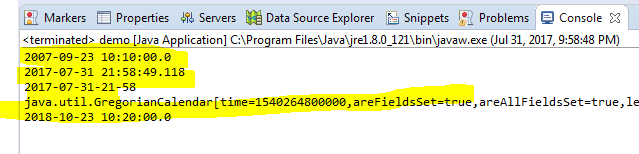
2007-09-23 10:10:00.0
2017-07-31 21:58:49.118
2017-07-31-21-58
java.util.GregorianCalendar[time=1540264800000,areFieldsSet=true,areAllFieldsSet=true,lenient=true,zone=sun.util.calendar.ZoneInfo[id="Asia/Bangkok",offset=25200000,dstSavings=0,useDaylight=false,transitions=3,lastRule=null],firstDayOfWeek=1,minimalDaysInFirstWeek=1,ERA=1,YEAR=2018,MONTH=9,WEEK_OF_YEAR=43,WEEK_OF_MONTH=4,DAY_OF_MONTH=23,DAY_OF_YEAR=296,DAY_OF_WEEK=3,DAY_OF_WEEK_IN_MONTH=4,AM_PM=0,HOUR=10,HOUR_OF_DAY=10,MINUTE=20,SECOND=0,MILLISECOND=0,ZONE_OFFSET=25200000,DST_OFFSET=0]
2018-10-23 10:20:00.0

17 June 2017

Hướng Dẫn Sử Dụng Tool IDE Java Online www.compilejava.net

Java IDE Online 2017
F2 (Run chạy chương trình)
F3 (Import a Gist URL?)
F12 (Tắt/Bật màn hình hiển thị kết quả)
Ctrl + A & Shift + Tab (Format định dạng code)

===Ngoài ra trên màn hình hiển thị===
Compile & Execute (Run chạy chương trình)
Paste Source (Đưa source code lên https://gist.github.com)
Download Zip (Tải code dưới dạng zip tự phân tách từng class)
Combobox theme (Chọn theme phù hợp với người dùng có theme eclipse)


16 June 2017

Java OOP:Điều khiển click trên màn hình bằng Interface Java

Điều khiển click trên màn hình bằng Interface
Mobile.java
Java Core 2017
import java.util.ArrayList;
import java.util.List;

public class Mobile {
    public static void main(String[] args) {
        // Running application
        MainActivity main = new MainActivity(); // Tạo mới app và lấy data 1 lần duy nhất
        ContactAdapter adapter = main.runningApp(); // Tạo mới class adapter 1 lần duy nhất
        // Click icon tren danh sach man hinh (Bấm nhiều lần với 1 lần tạo mới class
        // Adapter)
        adapter.setOnClickListenerAdd(3); // Click vị trí số 3 trên màn hình
        adapter.setOnClickListenerEdit(2); // Click vị trí số 2 trên mà hình
    }
}

interface IOnChildItemClick {
    public void onItemChildClickEdit(int position);

    public void onItemChildClickAdd(int position);
}

class ContactAdapter {
    private IOnChildItemClick iOnChildItemClick;

    public void registerChildItemClick(IOnChildItemClick iOnChildItemClick) {
        this.iOnChildItemClick = iOnChildItemClick;
    }

    public void setOnClickListenerEdit(int position) {
        iOnChildItemClick.onItemChildClickAdd(position);
    }

    public void setOnClickListenerAdd(int position) {
        iOnChildItemClick.onItemChildClickEdit(position);
    }
}

class MainActivity implements IOnChildItemClick {
    static List<String> listAvatar;
    static List<Integer> listNumber;
    public ContactAdapter adapter;

    @Override
    public void onItemChildClickEdit(int position) {
        // TODO Auto-generated method stub
        if (position != 0) {
            System.out.println("Update Contact: " + listNumber.get(position) + " URL: " + listAvatar.get(position)
                    + " --> Position: " + position);
        }
    }

    @Override
    public void onItemChildClickAdd(int position) {
        // TODO Auto-generated method stub
        if (position != 0) {
            System.out.println("Add new Contact: " + listNumber.get(position) + " URL: " + listAvatar.get(position)
                    + "  --> Position: " + position);
        }
    }

    public ContactAdapter runningApp() {
        System.out.println("Start the program!");
        adapter = new ContactAdapter();
        adapter.registerChildItemClick(this);
        initData();
        return adapter;
    }

    public static void initData() {
        listAvatar = new ArrayList<String>();
        listAvatar.add("D:/xyz.jpg");
        listAvatar.add("D:/AyR.jpg");
        listAvatar.add("D:/CSKH.jpg");
        listAvatar.add("D:/IMUSIK.jpg");

        listNumber = new ArrayList<Integer>();
        listNumber.add(983919892);
        listNumber.add(1666161033);
        listNumber.add(19008198);
        listNumber.add(197);
    }
}
Hướng dẫn chạy online
Chạy chương trình online coppy source vào đây

11 June 2017

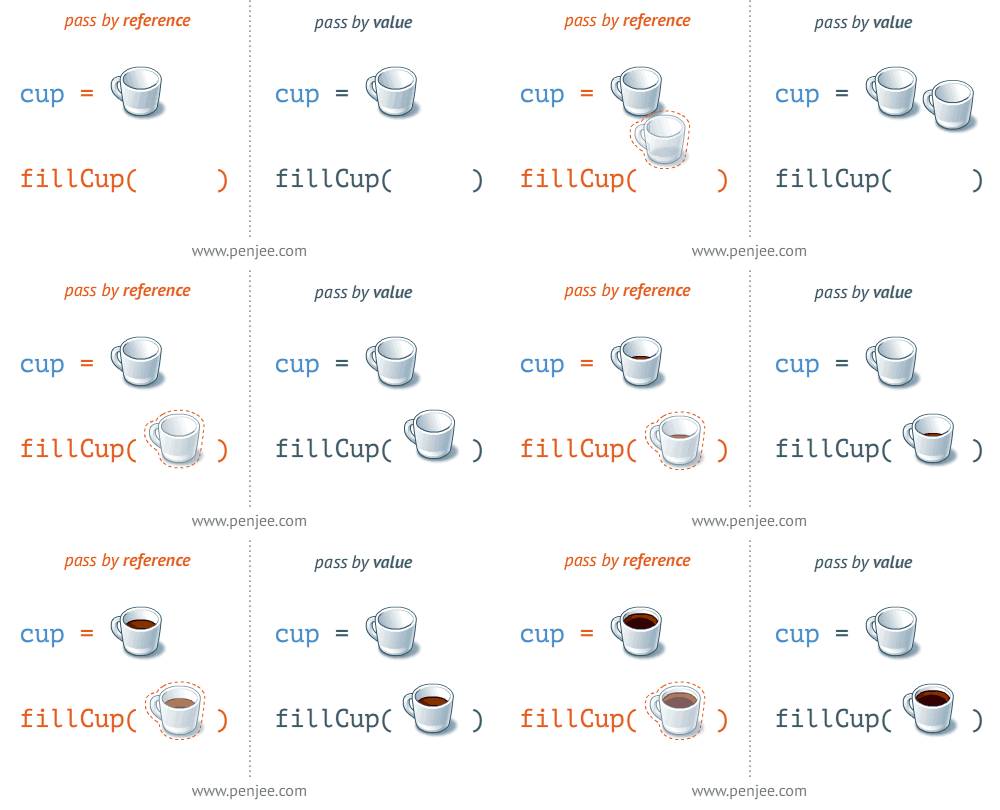
Pass-by-reference or Pass-by-value: Cách Java truyền đối số (Tham chiếu hay Giá trị )


Truyền đối số tham chiếu Pass-by-reference
Test.java
Java Core 2017
package com.demo;

public class Test {

    public static void main(String[] args) {
        Mytest mytest = new Mytest();
        mytest.a = 1;
        System.out.println("Test's x (in main) is: " + mytest.a);
        doSomething(mytest);
        System.out.println("Test's x (in main) is: " + mytest.a);
    }

    public static void doSomething(Mytest mytest) {
        mytest = new Mytest(2); //Pass by reference
        System.out.println("Test's x (in doSomething) is: " + mytest.a);
    }

    public static class Mytest {
        int a;
        public Mytest(int a) {
            this.a = a;
        }
        public Mytest() {
        }
    }
}
Output:
Test's x (in main) is: 1
Test's x (in doSomething) is: 2
Test's x (in main) is: 1
Truyền đối số giá trị Pass-by-value
Test.java
Java Core 2017
package com.demo;

public class Test {

    public static void main(String[] args) {
        Mytest mytest = new Mytest();
        mytest.a = 1;
        System.out.println("Test's x (in main) is: " + mytest.a);
        doSomething(mytest);
        System.out.println("Test's x (in main) is: " + mytest.a);
    }

    public static void doSomething(Mytest mytest) {
        mytest.a = 2; //Pass by value
        System.out.println("Test's x (in doSomething) is: " + mytest.a);
    }

    public static class Mytest {
        int a;
    }
}
Output:
Test's x (in main) is: 1
Test's x (in doSomething) is: 2
Test's x (in main) is: 2
Test.java
Java Core 2017
package com.demo;

public class Test {

    public static void main(String[] args) {
        int a = 1;
        System.out.println("a (in main) is: " + a);
        doSomething(a);
        System.out.println("a (in main) is: " + a);
    }

    public static void doSomething(int a) {
        a = 2; //Pass by value (VD này cần xem Immutable String là gì)
        System.out.println("a (in doSomething) is: " + a);
    }
}
Output:
a (in main) is: 1
a (in doSomething) is: 2
a (in main) is: 1
[1]. Khi khởi tạo đối tượng Mytest, biến mytest sẽ chứa địa chỉ của vùng nhớ đối tượng Mytest, đối tượng Mytest được lưu ở Heap. Và giá trị của biến mytest  được lưu ở Stack
[2]. Trong JAVA, có 2 kiểu biến: biến tham trị và tham chiếu.
Biến kiểu tham trị bao gồm các kiểu nguyên thủy của JAVA như: int, long, double…
Biến kiểu tham chiếu bao gồm: String, Integer, Array, kiểu đối tượng…

15 April 2017

Java: Đa luồng trong Java Multithreading in Java

1)New

The thread is in new state if you create an instance of Thread class but before the invocation of start() method.

2)Runnable

The thread is in runnable state after invocation of start() method, but the thread scheduler has not selected it to be the running thread.

3)Running

The thread is in running state if the thread scheduler has selected it.

4)Non-Runnable (Blocked)

This is the state when the thread is still alive, but is currently not eligible to run.

5)Terminated

A thread is in terminated or dead state when its run() method exits.

Làm thế nào để tạo Thread:

Chúng ta có hai cách tạo Thread:
  1. Bằng extending Thread class
  2. Bằng implementing Runnable interface.

Thread class:

Lớp Thread cung cấp Constructors và Methods để tạo và thực hiện các thao tác trên một luồng.
Sử dụng Constructors của Thread:

  • Thread()
  • Thread(String name)
  • Thread(Runnable r)
  • Thread(Runnable r,String name)

Sử dụng Methods của Thread:

  1. public void run(): is used to perform action for a thread.
  2. public void start(): starts the execution of the thread.JVM calls the run() method on the thread.
  3. public void sleep(long miliseconds): Causes the currently executing thread to sleep (temporarily cease execution) for the specified number of milliseconds.
  4. public void join(): waits for a thread to die.
  5. public void join(long miliseconds): waits for a thread to die for the specified miliseconds.
  6. public int getPriority(): returns the priority of the thread.
  7. public int setPriority(int priority): changes the priority of the thread.
  8. public String getName(): returns the name of the thread.
  9. public void setName(String name): changes the name of the thread.
  10. public Thread currentThread(): returns the reference of currently executing thread.
  11. public int getId(): returns the id of the thread.
  12. public Thread.State getState(): returns the state of the thread.
  13. public boolean isAlive(): tests if the thread is alive.
  14. public void yield(): causes the currently executing thread object to temporarily pause and allow other threads to execute.
  15. public void suspend(): is used to suspend the thread(depricated).
  16. public void resume(): is used to resume the suspended thread(depricated).
  17. public void stop(): is used to stop the thread(depricated).
  18. public boolean isDaemon(): tests if the thread is a daemon thread.
  19. public void setDaemon(boolean b): marks the thread as daemon or user thread.
  20. public void interrupt(): interrupts the thread.
  21. public boolean isInterrupted(): tests if the thread has been interrupted.
  22. public static boolean interrupted(): tests if the current thread has been interrupted.

Runnable interface:

Giao diện Runnable chỉ có một phương thức có tên run ().
  1. public void run(): Được sử dụng để thực hiện hành động cho Thread.

1) Bằng extending Thread class:

  1. class Multi extends Thread{  
  2.      public void run(){  
  3.          System.out.println("thread is running...");  
  4.     }  
  5.      public static void main(String args[]){  
  6.          Multi t1=new Multi();  
  7.          t1.start();  
  8.     }  
  9. }  
Output:thread is running...

2) Bằng implementing Runnable interface:

  1. class Multi3 implements Runnable{  
  2.       public void run(){  
  3.           System.out.println("thread is running...");  
  4.      }  
  5.       public static void main(String args[]){  
  6.           Multi3 m1=new Multi3();  
  7.           Thread t1 =new Thread(m1);  
  8.           t1.start();  
  9.      }  
  10. }  
Output:thread is running...

Tìm hiểu thêm tại đây


BACK TO TOP

Xuống cuối trang